| Site Info: | Favorites: | C++: | Fun: | Newer Stuff: | Old Fun: | Old Tech: | Old Other: |
| News | Rating System | MinGW Distro | Image Hacking | SF Reviews | Origami Polyhedra | bwtzip | Quotations |
| Stephan T. Lavavej | Paper Airplane | Random Work | Book Reviews | ||||
| Deus Ex | PNG | Downloads | |||||
| Anime/SF | Mersenne Primes | Wallpaper | |||||
| Foundation | Diet |
My MinGW distribution ("distro") is x64-native and currently contains GCC 15.2.0 and Boost 1.90.0.
mingw-20.0.exe (62.5 MB) : This is a self-extracting archive. It's incredibly easy to install; see How To Install below.
My build scripts are available on GitHub, and they're also stored within the distro itself.
I recommend installing 7-Zip, gh, and git; I don't bundle them in the distro anymore.
The components of this distro fall into these categories:
* With jpegtran.
I recommend that anyone who is learning Standard C++ and who uses Windows for a primary development environment should use three compilers: the most modern versions of MSVC, Clang, and GCC. Using three compilers that conform closely to the Standard subjects your code to more strenuous trials than using a single compiler would. (The easiest way to obtain Clang is via Visual Studio's installer.)
MinGW is a port of GCC to Windows. It is free of charge and simple to use (well, as simple as toolchains ever get). It produces standalone Windows executables which may be distributed in any manner. MinGW's official website mingw-w64.org provides various builds, but I maintain my own distro because I demand complete control. (It's a long story, but mingw-w64 forked from mingw.org. Although my distro was based on mingw.org for many years, I now consider mingw-w64 to be the one true MinGW.)
Please note that I did not write any of the components of my distro. I simply compiled them and packaged them together.
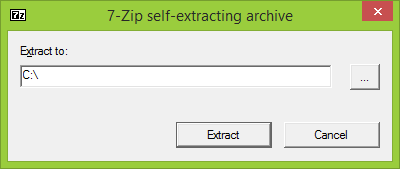
First, run the self-extracting archive. It'll ask you for a directory:
Whatever you say, it'll create a MinGW subdirectory there. I recommend saying C:\ (as in the screenshot) so it'll create C:\MinGW .
Second, click Extract. It'll display a progress bar:
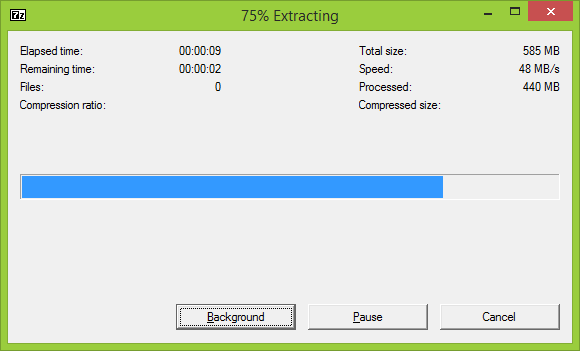
Just wait until it's done. I've gone to great lengths to make the distro as small as possible, but there's still a lot of stuff to extract.
Third, open the root of the distro, which is C:\MinGW if you followed my recommendation. There, you'll find two batch files and README_STL.txt . Inside the readme, there are copies of this webpage's Contents and History sections in case you forget which version of the distro you have or what it contains. There are also the following usage instructions:
Option A: In Windows Terminal, add a Command Prompt profile and set its command line to
    `%SystemRoot%\System32\cmd.exe /k C:\MinGW\set_distro_paths.bat` (without backticks).
    By default, the profile's starting directory will be System32, which is undesirable.
    So, create a working directory somewhere and set the profile's starting directory
    accordingly (e.g. I use C:\Temp).

Option B: In an existing Command Prompt, run set_distro_paths.bat to add the
    distro to that Command Prompt's PATH.

Option C: Create a shortcut to open_distro_window.bat, which will open a new
    Command Prompt with the distro on its PATH. You may move the shortcut
    to another directory (or the Desktop), and you may modify the
    shortcut's properties to start in a directory of your choice (for
    example, C:\Temp).

Leave set_distro_paths.bat and open_distro_window.bat in the root of the distro.

Option A is easily reversible. Neither Option B nor Option C permanently modifies your system.
|
Finally, type g++ --version in your Command Prompt and hit Enter. You should see something like this:
C:\Temp>g++ --version g++ (GCC) 15.2.0 Copyright (C) 2025 Free Software Foundation, Inc. This is free software; see the source for copying conditions. There is NO warranty; not even for MERCHANTABILITY or FITNESS FOR A PARTICULAR PURPOSE. C:\Temp> |
If you see something like that, then you have successfully installed MinGW.
Notes:
C:\MinGW . If you feel like playing with fire, I even tested paths-with-spaces when I wrote my batch files, but I can't guarantee that all of the distro's components will be similarly tolerant.Simply replace C:\MinGW .
I shouldn't need to warn you about extracting a newer version of the distro into a directory which already contains an older version. That would create a mess.
Simply delete C:\MinGW .
components-20.0.7z (60.8 MB) : My distro is formed by extracting these binary components into a single directory, then adding the batch files and readme. These binary components are useful if you want to create a subset of my distro, or if you want to update a few components without having to rebuild everything.
Building the components from scratch requires a few things. First, you'll need their sources, which you can obtain from their official websites. Second, you'll need my build scripts and patches, which are in the scripts-VERSION subdirectory in the root of the distro. Finally, the build scripts must be run in MSYS2, and README.md in scripts-VERSION explains how to set that up.
The scripts-VERSION subdirectory is a git repository, available on GitHub.
| Distro | Date | GCC | Boost | Changes |
| 20.0 | 2026-01-01 | 15.2.0 | 1.90.0 | Removed: grep, LAME, PCRE2. Updated: binutils 2.45.1, Boost 1.90.0, FreeType 2.14.1, GCC 15.2.0, gdb 17.1, glbinding 3.5.0, GLFW 3.4, GLM 1.0.3, libjpeg-turbo 3.1.3, libogg 1.3.6, libpng 1.6.53, OptiPNG 7.9.1, pngcheck 4.0.1, ripgrep 15.1.0, SDL 2.32.10, SDL_mixer 2.8.1, uutils/coreutils 0.5.0, vorbis-tools 1.4.3, zlib 1.3.1, zstd 1.5.7. |
| 19.0 | 2024-01-14 | 13.2.0 | 1.84.0 | Added: ripgrep 14.1.0, uutils/coreutils 0.0.23. Removed: 7-Zip, coreutils, gh, git, PCRE. Updated: binutils 2.41, Boost 1.84.0, FreeType 2.13.2, GCC 13.2.0, gdb 14.1, glbinding 3.3.0, GLFW 3.3.9, grep 3.11, libjpeg-turbo 3.0.1, libpng 1.6.40, make 4.4.1, mingw-w64 11.0.1, OptiPNG 0.7.8, PCRE2 10.42, SDL 2.28.5, SDL_mixer 2.6.3, sed 4.9, zlib 1.3, zstd 1.5.5. |
| 18.0 | 2021-10-30 | 11.2.0 | 1.77.0 | Added: gh 2.2.0. Updated: binutils 2.37, Boost 1.77.0, coreutils 9.0, FreeType 2.11.0, GCC 11.2.0, gdb 11.1, git 2.33.1, GLFW 3.3.5, GLM 0.9.9.8, grep 3.7, libjpeg-turbo 2.1.1, libogg 1.3.5, libvorbis 1.3.7, make 4.3, mingw-w64 9.0.0, PCRE 8.45, PCRE2 10.37, pngcheck 3.0.3, SDL 2.0.16, sed 4.8, vorbis-tools 1.4.2, zstd 1.5.0. |
| 17.1 | 2019-12-11 | 9.2.0 | 1.71.0 | Updated: git 2.24.1.2. |
| 17.0 | 2019-11-27 | 9.2.0 | 1.71.0 | Added: GLFW 3.3. Updated: 7-Zip 19.00, binutils 2.33.1, Boost 1.71.0, coreutils 8.31, FreeType 2.10.1, GCC 9.2.0, gdb 8.3.1, git 2.24.0.2, glbinding 3.1.0, GLM 0.9.9.6, libjpeg-turbo 2.0.3, libogg 1.3.4, libpng 1.6.37, mingw-w64 7.0.0, PCRE 8.43, PCRE2 10.34, SDL 2.0.10, zstd 1.4.4. |
| 16.1 | 2018-12-30 | 8.2.0 | 1.69.0 | Added: OptiPNG 0.7.7, zstd 1.3.8. Removed: libbzip2, pngcrush. Updated: binutils 2.31.1, Boost 1.69.0, coreutils 8.30, GCC 8.2.0, gdb 8.2.1, git 2.20.1, glbinding 3.0.2, GLM 0.9.9.3, grep 3.3, libjpeg-turbo 2.0.1, libpng 1.6.36, mingw-w64 6.0.0, PCRE2 10.32, SDL 2.0.9, SDL_mixer 2.0.4, sed 4.7. |
| 16.0 | 2018-07-04 | 8.1.0 | 1.67.0 | Updated: 7-Zip 18.05, binutils 2.30, Boost 1.67.0, FreeType 2.9.1, GCC 8.1.0, git 2.18.0, GLM 0.9.9.0, libvorbis 1.3.6, mingw-w64 5.0.4, PCRE 8.42, SDL 2.0.8, sed 4.5. |
| 15.4 | 2018-02-27 | 7.3.0 | 1.66.0 | Updated: 7-Zip 18.01, Boost 1.66.0, coreutils 8.29, FreeType 2.9, GCC 7.3.0, gdb 8.1, git 2.16.2, glbinding 2.1.4, LAME 3.100, libjpeg-turbo 1.5.3, libogg 1.3.3, libpng 1.6.34, mingw-w64 5.0.3, PCRE2 10.31, SDL 2.0.7, SDL_mixer 2.0.2. |
| 15.3 | 2017-10-07 | 7.2.0 | 1.65.1 | Updated: git 2.14.2.2. |
| 15.2 | 2017-10-03 | 7.2.0 | 1.65.1 | Added winpthreads and OpenMP to GCC. Updated: binutils 2.29.1, Boost 1.65.1, coreutils 8.28, FreeType 2.8.1, gdb 8.0.1, git 2.14.2, libpng 1.6.32, pngcrush 1.8.13, SDL 2.0.6. |
| 15.1 | 2017-08-27 | 7.2.0 | 1.65.0 | Added: PCRE2 10.30. Updated: binutils 2.29, Boost 1.65.0, GCC 7.2.0, git 2.14.1, GLM 0.9.8.5, grep 3.1, libjpeg-turbo 1.5.2, libpng 1.6.30, PCRE 8.41, pngcrush 1.8.12. |
| 15.0 | 2017-06-05 | 7.1.0 | 1.64.0 | Updated: binutils 2.28, Boost 1.64.0, coreutils 8.27, FreeType 2.8, GCC 7.1.0, gdb 8.0, git 2.13.0, glbinding 2.1.3, GLM 0.9.8.4, libpng 1.6.29, mingw-w64 5.0.2, PCRE 8.40, pngcrush 1.8.11, sed 4.4, zlib 1.2.11. |
| 14.1 | 2016-12-28 | 6.3.0 | 1.63.0 | Updated: 7-Zip 16.04, binutils 2.27, Boost 1.63.0, coreutils 8.26, FreeType 2.7, GCC 6.3.0, gdb 7.12, git 2.11.0, glbinding 2.1.1, GLM 0.9.8.3, libjpeg-turbo 1.5.1, libpng 1.6.26, make 4.2.1, mingw-w64 5.0.0, PCRE 8.39, pngcrush 1.8.10, SDL 2.0.5. |
| 14.0 | 2016-05-29 | 6.1.0 | 1.61.0 | Added: glbinding 2.0.0. Removed: GLEW. Updated: 7-Zip 16.02, Boost 1.61.0, GCC 6.1.0, git 2.8.3, GLM 0.9.7.5, make 4.2. |
| 13.5 | 2016-04-14 | 5.3.0 | 1.60.0 | Updated: 7-Zip 15.14, binutils 2.26, coreutils 8.25, FreeType 2.6.3, gdb 7.11, git 2.8.1, GLM 0.9.7.4, libpng 1.6.21, mingw-w64 4.0.6, PCRE 8.38, pngcrush 1.8.1, SDL 2.0.4, SDL_mixer 2.0.1. Rebuilt: Everything. |
| 13.4 | 2015-12-23 | 5.3.0 | 1.60.0 | Removed: FCIV (use "7z h -scrcsha1" or "7z h -scrcsha256"). Updated: 7-Zip 15.12, Boost 1.60.0, FreeType 2.6.2, GCC 5.3.0, gdb 7.10.1, git 2.6.4, libpng 1.6.20, pngcrush 1.7.88. Rebuilt: Everything. |
| 13.3 | 2015-11-07 | 5.2.0 | 1.59.0 | Updated: git 2.6.2, pngcrush 1.7.87. |
| 13.2 | 2015-10-10 | 5.2.0 | 1.59.0 | Updated: FreeType 2.6.1, git 2.6.1. Rebuilt: Everything, with MSYS2. |
| 13.1 | 2015-09-28 | 5.2.0 | 1.59.0 | Updated: binutils 2.25.1, Boost 1.59.0, coreutils 8.24, FreeType 2.6, GCC 5.2.0, gdb 7.10, git 2.5.3, GLEW 1.13.0, GLM 0.9.7.1, libjpeg-turbo 1.4.2, libpng 1.6.18, mingw-w64 4.0.4, PCRE 8.37, pngcrush 1.7.86. Rebuilt: Everything. |
| 13.0 | 2015-04-30 | 5.1.0 | 1.58.0 | Added: FCIV 2.05. Removed: sha1sum, sha256sum, sha512sum. Updated: Boost 1.58.0, GCC 5.1.0, gdb 7.9, git 1.9.5 20150319, GLEW 1.12.0, GLM 0.9.6.3, libjpeg-turbo 1.4.0, libpng 1.6.17, libvorbis 1.3.5, mingw-w64 4.0.2, pngcrush 1.7.85. Rebuilt: Everything. |
| 12.2 | 2015-01-04 | 4.9.2 | 1.57.0 | Updated: binutils 2.25, Boost 1.57.0, FreeType 2.5.5, GCC 4.9.2, gdb 7.8.1, git 1.9.5 20141217, GLM 0.9.6.1, libpng 1.6.16, make 4.1, mingw-w64 3.3.0, PCRE 8.36, pngcrush 1.7.82. Rebuilt: Everything. |
| 12.1 | 2014-09-02 | 4.9.1 | 1.56.0 | Updated: git 1.9.4 20140815, GLEW 1.11.0, libpng 1.6.13, mingw-w64 3.2.0, pngcrush 1.7.77. Enabled Unicode in PCRE. Rebuilt: Everything. |
| 12.0 | 2014-08-09 | 4.9.1 | 1.56.0 | Restored GCC's default mode to C++03. (Compile with -std=c++11 for C++11, or -std=c++1y for C++14.) Removed: wget. Updated: Boost 1.56.0, coreutils 8.23, FreeType 2.5.3, GCC 4.9.1, gdb 7.8, git 1.9.4 20140611, GLM 0.9.5.4, libjpeg-turbo 1.3.1, libogg 1.3.2, libpng 1.6.12, libvorbis 1.3.4, PCRE 8.35, pngcrush 1.7.76, SDL 2.0.3. Rebuilt: Everything. |
| 11.6 | 2014-01-19 | 4.8.2 | 1.55.0 | Added: gdb 7.6.2. Patched: PCRE 8.34 (adding pcregrep). |
| 11.5 | 2014-01-12 | 4.8.2 | 1.55.0 | Updated: binutils 2.24, coreutils 8.22, FreeType 2.5.2, git 1.8.5.2 20131230, GLM 0.9.5.1, libpng 1.6.8, make 4.0 a4937bc, mingw-w64 3.1.0, PCRE 8.34, pngcrush 1.7.70. Rebuilt: Everything. |
| 11.4 | 2013-11-25 | 4.8.2 | 1.55.0 | Updated: FreeType 2.5.1. Patched: make 4.0. |
| 11.3 | 2013-11-17 | 4.8.2 | 1.55.0 | Updated: Boost 1.55.0, GCC 4.8.2, git 1.8.4 20130916, GLM 0.9.4.6, libpng 1.6.7, make 4.0, mingw-w64 3.0.0, pngcrush 1.7.69, SDL 2.0.1. Rebuilt: Everything. |
| 11.2 | 2013-09-08 | 4.8.1 | 1.54.0 | Patched: GLEW 1.10.0. |
| 11.1 | 2013-08-13 | 4.8.1 | 1.54.0 | Removed: diffutils (use "git diff"), patch (use "git apply"). Updated: GLM 0.9.4.5, pngcrush 1.7.67, SDL 2.0.0, SDL_mixer 2.0.0. |
| 11.0 | 2013-08-10 | 4.8.1 | 1.54.0 | The distro is now x64-native. Added: mingw-w64 3.0-5986. Removed: mingw-runtime, w32api. Rebuilt: EVERYTHING. |
| 10.4 | 2013-08-01 | 4.8.1 | 1.54.0 | Removed: x86 "7za" (use x64 "7z"), pngrewrite. Updated: GLEW 1.10.0. Patched: SDL 2.0.0-7469. Rebuilt: binutils 2.23.2, FreeType 2.5.0.1, everything. |
| 10.3 | 2013-07-19 | 4.8.1 | 1.54.0 | Added: GLM 0.9.4.4. Updated: Boost 1.54.0, FreeType 2.5.0.1, libpng 1.6.3, pngcrush 1.7.66, SDL 2.0.0-7469, SDL_mixer 2.0.0-650. |
| 10.2 | 2013-06-09 | 4.8.1 | 1.53.0 | Updated: FreeType 2.4.12, GCC 4.8.1, git 1.8.3 20130601, libjpeg-turbo 1.3.0, libogg 1.3.1, PCRE 8.33, pngcrush 1.7.60. Rebuilt: Everything. |
| 10.1 | 2013-05-10 | 4.8.0 | 1.53.0 | Added: libjpeg-turbo 1.2.90. Removed: libjpeg. Updated: libpng 1.6.2, pngcrush 1.7.58, zlib 1.2.8. Rebuilt: Boost 1.53.0, pngcheck 2.3.0, pngrewrite 1.4.0, SDL 1.2.15. |
| 10.0 | 2013-04-01 | 4.8.0 | 1.53.0 | Updated: binutils 2.23.2, coreutils 8.21, diffutils 3.3, GCC 4.8.0, libpng 1.6.1, pngcrush 1.7.54. Rebuilt: Everything. |
| 9.6 | 2013-02-09 | 4.7.2 | 1.53.0 | Updated: Boost 1.53.0, git 1.8.1.2 20130201, jpegtran 9, libjpeg 9, libpng 1.5.14, pngcrush 1.7.47, sed 4.2.2. Rebuilt: pngcheck 2.3.0, pngrewrite 1.4.0. |
| 9.5 | 2012-12-09 | 4.7.2 | 1.52.0 | Updated: binutils 2.23.1, Boost 1.52.0, coreutils 8.20, git 1.8.0 20121022, libpng 1.5.13, PCRE 8.32, pngcrush 1.7.41. Rebuilt: Everything. |
| 9.4 | 2012-09-29 | 4.7.2 | 1.51.0 | Updated: GCC 4.7.2. Rebuilt: Everything. |
| 9.3 | 2012-09-13 | 4.7.1 | 1.51.0 | Updated: Boost 1.51.0, coreutils 8.19, git 1.7.11 20120710, GLEW 1.9.0, libpng 1.5.12, mingw-runtime 3.20-2, PCRE 8.31, pngcrush 1.7.37, wget 1.14. Rebuilt: Everything. |
| 9.2 | 2012-07-05 | 4.7.1 | 1.50.0 | Updated: Boost 1.50.0, git 1.7.11 (20120704), pngcrush 1.7.31. |
| 9.1 | 2012-06-21 | 4.7.1 | 1.49.0 | Updated: coreutils 8.17, FreeType 2.4.10, GCC 4.7.1, git 1.7.11, libpng 1.5.11, libvorbis 1.3.3, pngcrush 1.7.30, zlib 1.2.7. Rebuilt: Everything. |
| 9.0 | 2012-03-29 | 4.7.0 | 1.49.0 | Updated: GCC 4.7.0. Rebuilt: Everything. |
| 8.0 | 2012-03-21 | 4.6.3 | 1.49.0 | Changed GCC's default mode to C++11. Added set_distro_paths.bat and open_distro_window.bat. Added: git 1.7.9. Updated: binutils 2.22, Boost 1.49.0, coreutils 8.15, diffutils 3.2, FreeType 2.4.9, GCC 4.6.3, GLEW 1.7.0, grep 2.10, jpegtran 8d, LAME 3.99.5, libjpeg 8d, libpng 1.5.9, mingw-runtime 3.20, PCRE 8.30, pngcrush 1.7.25, SDL 1.2.15, SDL_mixer 1.2.12, wget 1.13.4, zlib 1.2.6. Rebuilt: Everything. |
| 7.2 | 2011-08-19 | 4.6.1 | 1.47.0 | Added: PCRE 8.12. Updated: binutils 2.21.1, Boost 1.47.0, coreutils 8.12, diffutils 3.1, FreeType 2.4.6, GCC 4.6.1, GLEW 1.6.0, grep 2.9, libogg 1.3.0, libpng 1.5.4, pngcrush 1.7.16. Rebuilt: Everything. |
| 7.1 | 2011-04-13 | 4.6.0 | 1.46.1 | Patched: grep 2.7 (with PCRE 8.12). |
| 7.0 | 2011-04-10 | 4.6.0 | 1.46.1 | Patched: mingw-runtime 3.18. Updated: GCC 4.6.0, libpng 1.5.2. Rebuilt: Everything. |
| 6.12 | 2011-04-01 | 4.5.2 | 1.46.1 | Updated: pngcrush 1.7.15, w32api 3.17-2. Rebuilt: Everything. |
| 6.11 | 2011-03-13 | 4.5.2 | 1.46.1 | Updated: Boost 1.46.1. |
| 6.10 | 2011-03-03 | 4.5.2 | 1.46.0 | Updated: Boost 1.46.0, coreutils 8.10, GLEW 1.5.8, jpegtran 8c, libjpeg 8c, libpng 1.5.1, pngcrush 1.7.14. Rebuilt: pngcheck 2.3.0, pngrewrite 1.4.0. |
| 6.9 | 2010-12-31 | 4.5.2 | 1.45.0 | Updated: binutils 2.21, coreutils 8.8, FreeType 2.4.4, GCC 4.5.2, libogg 1.2.2, libpng 1.4.5, pngcrush 1.7.13. Rebuilt: Everything. |
| 6.8 | 2010-11-20 | 4.5.1 | 1.45.0 | Updated: 7-Zip 9.20, Boost 1.45.0. Rebuilt: SDL 1.2.14. |
| 6.7 | 2010-11-16 | 4.5.1 | 1.44.0 | Patched: Boost 1.44.0 (fixing Boost.Thread), GCC 4.5.1 (fixing LTO). Updated: coreutils 8.7, FreeType 2.4.3, GLEW 1.5.7, grep 2.7, libbzip2 1.0.6, libogg 1.2.1, libpng 1.4.4, libvorbis 1.3.2, w32api 3.15. Rebuilt: Everything. |
| 6.6 | 2010-08-22 | 4.5.1 | 1.44.0 | Rebuilt: GCC 4.5.1. |
| 6.5 | 2010-08-18 | 4.5.1 | 1.44.0 | Updated: Boost 1.44.0, FreeType 2.4.2, GCC 4.5.1, make 3.82, pngcrush 1.7.12. Rebuilt: Everything. |
| 6.4 | 2010-07-17 | 4.5.0 | 1.43.0 | Updated: FreeType 2.4.0, GLEW 1.5.5. |
| 6.3 | 2010-07-09 | 4.5.0 | 1.43.0 | Updated: jpegtran 8b, libjpeg 8b. Rebuilt: FreeType 2.3.12. |
| 6.2 | 2010-07-07 | 4.5.0 | 1.43.0 | Updated: coreutils 8.5, grep 2.6.3, libpng 1.4.3, pngcrush 1.7.11, pngrewrite 1.4.0. Rebuilt: Everything. |
| 6.1 | 2010-05-05 | 4.5.0 | 1.43.0 | Removed: GLee, UPX. Updated: Boost 1.43.0, diffutils 3.0, GLEW 1.5.4, zlib 1.2.5. Rebuilt: libpng 1.4.1, pngcheck 2.3.0, pngcrush 1.7.10, pngrewrite 1.3.0. |
| 6.0 | 2010-04-16 | 4.5.0 | 1.42.0 | Added: GLEW 1.5.3. Patched: diffutils 2.9. Updated: GCC 4.5.0. Rebuilt: Everything. |
| 5.5 | 2010-04-02 | 4.4.1 | 1.42.0 | Patched: coreutils 8.4. Updated: LAME 3.98.4, libogg 1.2.0, libvorbis 1.3.1, vorbis-tools 1.4.0. |
| 5.4 | 2010-03-21 | 4.4.1 | 1.42.0 | Removed: bzip2. (Use "7za x" instead of "bunzip2".) Updated: coreutils 8.4, diffutils 2.9. |
| 5.3 | 2010-03-19 | 4.4.1 | 1.42.0 | Added: LAME 3.98.3. Updated: pngcrush 1.7.10, zlib 1.2.4. Rebuilt: Everything, fixing a psychotic relocation bug. |
| 5.2 | 2010-03-13 | 4.4.1 | 1.42.0 | Removed: tar. (Use "7za a", "7za l", and "7za x" instead of "tar cf", "tar tf", and "tar xf".) Updated: binutils 2.20.1, jpegtran 8a, libjpeg 8a, mingw-runtime 3.18. Rebuilt: Everything. |
| 5.1 | 2010-03-02 | 4.4.1 | 1.42.0 | Added: 7-Zip x64. ("7za" is x86, "7z" is x64.) Removed: factor, gzip, split. (Use "7za x" instead of "gzip -d" for decompression.) Updated: Boost 1.42.0, FreeType 2.3.12, jpegtran 8, libjpeg 8, libpng 1.4.1, pngcrush 1.7.9. Rebuilt: Everything, without UPX compression. |
| 5.0 | 2010-01-06 | 4.4.1 | 1.41.0 | Updated: GCC 4.4.1-nuwen, libpng 1.4.0. Rebuilt: Everything. |
| 4.3 | 2010-01-01 | 4.3.3 | 1.41.0 | Added: 7-Zip 4.65. Updated: binutils 2.20, Boost 1.41.0, FreeType 2.3.11, gzip 1.3.13, jpegtran 7, libjpeg 7, libogg 1.1.4, libpng 1.2.41, libvorbis 1.2.3, make 3.81 20090914, mingw-runtime 3.17, patch 2.6.1, pngcrush 1.7.6, SDL 1.2.14, SDL_mixer 1.2.11, sed 4.2.1, UPX 3.04, w32api 3.14, wget 1.12. Rebuilt: Everything. |
| 4.2 | 2009-05-18 | 4.3.3 | 1.39.0 | Updated: Boost 1.39.0, FreeType 2.3.9, pngcrush 1.6.17, sed 4.2. Rebuilt: Everything. |
| 4.1 | 2009-02-22 | 4.3.3 | 1.38.0 | Removed: boost-jam. Updated: binutils 2.19.1, Boost 1.38.0, FreeType 2.3.8, GCC 4.3.3-dw2-tdm-1, GLee 5.4, grep 2.5.4, libpng 1.2.35, mingw-runtime 3.15.2, pngcrush 1.6.14. Rebuilt: Everything. |
| 4.0 | 2008-12-31 | 4.3.2 | 1.37.0 | Removed: bison, flex. Updated: binutils 2.19, boost-jam 3.1.17, GCC 4.3.2-dw2, libpng 1.2.34, mingw-runtime 3.15.1, pngcrush 1.6.12, pngrewrite 1.3.0, w32api 3.13. Rebuilt: Everything. |
| 3.14 | 2008-11-09 | 4.2.1 | 1.37.0 | Updated: Boost 1.37.0, libpng 1.2.33, pngcrush 1.6.11. Rebuilt: pngcheck 2.3.0, pngrewrite 1.2.1. |
| 3.13 | 2008-10-12 | 4.2.1 | 1.36.0 | Updated: GLee 5.33, libpng 1.2.32, pngcrush 1.6.10. Rebuilt: pngcheck 2.3.0, pngrewrite 1.2.1. |
| 3.12 | 2008-09-21 | 4.2.1 | 1.36.0 | Patched: FreeType 2.3.7, libjpeg 6b. |
| 3.11 | 2008-08-22 | 4.2.1 | 1.36.0 | Updated: libpng 1.2.31, pngcrush 1.6.9. Rebuilt: Boost 1.36.0, pngcheck 2.3.0, pngrewrite 1.2.1. |
| 3.10 | 2008-08-14 | 4.2.1 | 1.36.0 | Updated: Boost 1.36.0, FreeType 2.3.7, pngcrush 1.6.7, wget 1.11.4. |
| 3.9 | 2008-05-19 | 4.2.1 | 1.35.0 | Removed: cat, cvs, expand, glpng, SDL_ttf. Updated: libpng 1.2.29, pngcrush 1.6.5. Rebuilt: pngcheck 2.3.0, pngrewrite 1.2.1. |
| 3.8 | 2008-05-05 | 4.2.1 | 1.35.0 | Updated: libpng 1.2.28, make 3.81 20080326-2, UPX 3.03, wget 1.11.2. Rebuilt: pngcheck 2.3.0, pngcrush 1.6.4, pngrewrite 1.2.1. |
| 3.7 | 2008-03-31 | 4.2.1 | 1.35.0 | Updated: binutils 2.18.50 20080109-2, Boost 1.35.0, bzip2 1.0.5, make 3.81 20080326, vorbis-tools 1.2.0, wget 1.11.1. |
| 3.6 | 2008-02-28 | 4.2.1 | 1.34.1 | Updated: libpng 1.2.25, wget 1.11. Rebuilt: flex 2.5.4a, pngcheck 2.3.0, pngcrush 1.6.4, pngrewrite 1.2.1. |
| 3.5 | 2008-01-13 | 4.2.1 | 1.34.1 | Added: FreeType 2.3.5, SDL_ttf 2.0.9. Updated: binutils 2.18.50 20080109. |
| 3.4 | 2007-12-31 | 4.2.1 | 1.34.1 | Updated: SDL 1.2.13. |
| 3.3 | 2007-12-29 | 4.2.1 | 1.34.1 | Patched: Boost 1.34.1. Updated: binutils 2.18.50 20071123, boost-jam 3.1.16, libpng 1.2.24, mingw-runtime 3.14, UPX 3.02, w32api 3.11. Rebuilt: Everything. |
| 3.2 | 2007-10-21 | 4.2.1 | 1.34.1 | Updated: libpng 1.2.22. Rebuilt: pngcheck 2.3.0, pngcrush 1.6.4, pngrewrite 1.2.1. |
| 3.1 | 2007-09-10 | 4.2.1 | 1.34.1 | Added: GLee 5.21. Updated: libpng 1.2.20. Rebuilt: pngcheck 2.3.0, pngcrush 1.6.4, pngrewrite 1.2.1. |
| 3.0 | 2007-08-19 | 4.2.1 | 1.34.1 | Patched: boost-jam 3.1.14. Rebuilt: Boost 1.34.1. Updated: GCC 4.2.1-dw2-2, grep 2.5.3, libpng 1.2.19, libvorbis 1.2.0, mingw-runtime 3.13, UPX 3.01, w32api 3.10. |
| 2.8 | 2007-08-02 | 4.1.2 | 1.34.1 | Rebuilt: SDL 1.2.12. |
| 2.7 | 2007-07-25 | 4.1.2 | 1.34.1 | Added: libogg 1.1.3, libvorbis 1.1.2, SDL_mixer 1.2.8, vorbis-tools 1.1.1. Updated: Boost 1.34.1. |
| 2.6 | 2007-07-20 | 4.1.2 | 1.34.0 | Updated: pngcheck 2.3.0, SDL 1.2.12. |
| 2.5 | 2007-05-18 | 4.1.2 | 1.34.0 | Updated: Boost 1.34.0, boost-jam 3.1.14, gzip 1.3.12, libpng 1.2.18, UPX 3.00. Rebuilt: pngcheck 2.2.0, pngcrush 1.6.4, pngrewrite 1.2.1. |
| 2.4 | 2007-05-06 | 4.1.2 | 1.34.x | Added: pngcheck 2.2.0. |
| 2.3 | 2007-04-05 | 4.1.2 | 1.34.x | Patched: patch 2.5.9. |
| 2.2 | 2007-03-28 | 4.1.2 | 1.34.x | Patched: GCC 4.1.2. Updated: mingw-runtime 3.12, w32api 3.9. |
| 2.1 | 2007-03-25 | 4.1.2 | 1.34.x | Updated: gzip 1.3.9, wget 1.10.2. Rebuilt: make 3.81. |
| 2.0 | 2007-02-26 | 4.1.2 | 1.34.x | Added: sed 4.1.5. Updated: binutils 2.17.50 20070129, GCC 4.1.2. |
| 1.13 | 2007-01-19 | 3.4.2 | 1.34.x | Patched: Boost 1.34.0 20061231. Updated: bzip2 1.0.4, libpng 1.2.15. Rebuilt: pngcrush 1.6.4, pngrewrite 1.2.1. |
| 1.12 | 2007-01-01 | 3.4.2 | 1.34.x | Updated: Boost 1.34.0 20061231. |
| 1.11 | 2006-12-13 | 3.4.2 | 1.33.1 | Updated: cvs 1.12.13a. |
| 1.10 | 2006-12-01 | 3.4.2 | 1.33.1 | Patched: libjpeg 6b. Updated: libpng 1.2.14. Rebuilt: pngcrush 1.6.4, pngrewrite 1.2.1. |
| 1.9 | 2006-11-20 | 3.4.2 | 1.33.1 | Added: jpegtran 6b. Updated: binutils 2.17.50 20060824, libpng 1.2.13, mingw-runtime 3.11, w32api 3.8. Rebuilt: pngcrush 1.6.4, pngrewrite 1.2.1. |
| 1.8 | 2006-08-08 | 3.4.2 | 1.33.1 | Added: libjpeg 6b. |
| 1.7 | 2006-06-28 | 3.4.2 | 1.33.1 | Updated: SDL 1.2.11. |
| 1.6 | 2006-06-22 | 3.4.2 | 1.33.1 | Patched: Boost 1.33.1. Removed: SDL_image. Updated: boost-jam 3.1.13, cvs 1.11.22, libpng 1.2.10, make 3.81, pngcrush 1.6.4, SDL 1.2.10, UPX 2.01, w32api 3.7. |
| 1.5 | 2006-03-12 | 3.4.2 | 1.33.1 | Removed: gdb. Updated: binutils 2.16.91 20060119, Boost 1.33.1, boost-jam 3.1.12, cvs 1.11.21, mingw-runtime 3.9, pngcrush 1.6.2, SDL 1.2.9, w32api 3.6. |
| 1.4 | 2005-09-18 | 3.4.2 | 1.33.0 | Updated: Boost 1.33.0, boost-jam 3.1.11. |
| 1.3 | 2005-07-30 | 3.4.2 | 1.32.0 | Patched: Boost 1.32.0. Updated: zlib 1.2.3. Rebuilt: pngcrush 1.5.10, pngrewrite 1.2.1. |
| 1.2 | 2005-07-06 | 3.4.2 | 1.32.0 | Added: pngcrush 1.5.10, pngrewrite 1.2.1. Updated: bzip2 1.0.3. |
| 1.1 | 2005-05-29 | 3.4.2 | 1.32.0 | Patched: Boost 1.32.0. Updated: cvs 1.11.20. |
| 1.0 | 2005-04-25 | 3.4.2 | 1.32.0 | First release. |
THE SOFTWARE IS PROVIDED "AS IS", WITHOUT WARRANTY OF ANY KIND, EXPRESS OR IMPLIED, INCLUDING BUT NOT LIMITED TO THE WARRANTIES OF MERCHANTABILITY, FITNESS FOR A PARTICULAR PURPOSE, TITLE AND NON-INFRINGEMENT. IN NO EVENT SHALL THE COPYRIGHT HOLDERS OR ANYONE DISTRIBUTING THE SOFTWARE BE LIABLE FOR ANY DAMAGES OR OTHER LIABILITY, WHETHER IN CONTRACT, TORT OR OTHERWISE, ARISING FROM, OUT OF OR IN CONNECTION WITH THE SOFTWARE OR THE USE OR OTHER DEALINGS IN THE SOFTWARE.
https://nuwen.net/mingw.html (updated 1/1/2026)
Stephan T. Lavavej
Home: stl@nuwen.net
Work: stl@microsoft.com
This is my personal website. I work for Microsoft, but I don't speak for them.